

The Challenge of 40-Degree Daily Temperature Swings
The September transition is officially here, and transitioning your thermostat settings for unpredictable fall weather is the only way to stay comfortable when morning frosts rapidly give way to afternoon heat. Here at Stone Heating and Air, we know exactly what this seasonal shift looks like for our Southern Oregon customers. You wake up at 6:00 AM to a freezing house that demands a heavy sweater and a hot cup of coffee. By 3:00 PM, the sun is beating through your living room windows, the indoor temperature is pushing into the 80s, and you find yourself sweating in your own home.
This extreme diurnal temperature variation forces many homeowners into a frustrating, constant battle with their HVAC control panels. You manually switch the system to 'Heat' before breakfast, turn it off entirely by noon, and then manually switch it over to 'Cool' when the afternoon heat spikes. Later that night, you have to remember to switch it back to 'Heat' again, or you will wake up shivering. This manual toggling is not just annoying; it is highly inefficient and creates unnecessary wear on your heating and cooling equipment.
Modern climate control technology offers a much better way. By leveraging advanced settings that already exist on most digital systems, you can automate your indoor comfort and let the equipment do the heavy lifting. If you are tired of playing human thermostat, exploring thermostat upgrades and optimization is the first step toward a more comfortable home.
Why Manual Toggling Strains Your HVAC System
Our technicians at Stone Heating and Air frequently notice that the Rogue Valley microclimate creates a unique dual-demand strain on local HVAC systems that you simply do not see in other parts of the country. When you manually force your system to bounce back and forth between heating and cooling modes, you are demanding a massive amount of mechanical effort from components that were designed to operate in longer, steadier cycles.
Rapidly switching a system from 'Heat' to 'Cool' can easily trigger a phenomenon known as short-cycling. Short-cycling occurs when an HVAC system turns on and off too quickly before completing a full heating or cooling cycle. This happens frequently during the fall when a homeowner feels a sudden chill, cranks the heat up by ten degrees, and then immediately shuts it down an hour later when the house gets too stuffy.
The mechanical toll of manual toggling includes:
• Compressor strain: The outdoor AC compressor requires a massive surge of electricity to start up. Forcing it to engage for short, sporadic bursts during a warm fall afternoon significantly shortens its lifespan.
• Blower motor fatigue: Your indoor blower motor is responsible for pushing conditioned air through your ductwork. Constant starts and stops generate excess heat within the motor itself, leading to premature failure.
• Reversing valve wear: If you utilize a heat pump, the reversing valve physically shifts to change the flow of refrigerant. Forcing it to switch directions multiple times a day accelerates mechanical wear.
Because dual-demand weather forces your equipment to work twice as hard, it highlights the absolute necessity of proactive care. Enrolling in a seasonal HVAC maintenance plan ensures that your blower motor, compressor, and electrical relays are fully prepared to handle the daily whiplash of Central Point's extreme temperature swings. Instead of manually fighting the weather, the smartest approach is to let your thermostat's internal logic manage the workload safely.
Unlocking 'Auto Changeover' for Seamless Comfort
The secret to surviving the September transition without touching your thermostat twice a day lies in a feature called 'Auto Changeover'. Many homeowners see the word 'Auto' on their thermostat screen and assume the system is already handling everything automatically. However, there is a massive functional difference between setting your fan to auto and enabling true automatic changeover mode.
The Difference Between 'Auto' Fan and 'Auto' Changeover
Understanding the distinction between these two settings is critical for protecting your equipment and maintaining a consistent indoor temperature.
• Auto Fan Mode — What It Actually Controls: Controls only the indoor blower fan. The fan turns on when the system is actively heating or cooling, and turns off when the cycle is done. — Impact on Fall Comfort: Helps save energy, but does not automatically switch the system from heating to cooling when the afternoon gets hot.
• Auto Changeover — What It Actually Controls: Controls the primary equipment. The thermostat actively decides whether to turn on the furnace or the air conditioner based on ambient temperature. — Impact on Fall Comfort: Completely eliminates manual toggling. Automatically runs the heat in the morning and the AC in the afternoon.
Why Auto Changeover is Essential for Early Fall
Auto Changeover is your primary defense against unpredictable fall weather. When this mode is engaged, the thermostat acts as the brain of the entire operation. It actively monitors the ambient indoor temperature and cross-references it with your preferred comfort settings. If the house drops to freezing overnight while everyone sleeps, the logic board automatically engages the furnace. Later that same day, when the afternoon sun hits the windows and threatens to overheat the living room, the system seamlessly transitions to cooling mode.
Because this setting requires both your heating and cooling equipment to be fully operational on the exact same day, preparing your system for this automated workload is exactly why September is the ideal time for your annual furnace tune-up. You need absolute confidence that the furnace will ignite safely after sitting dormant all summer, right before the AC kicks back on a few hours later.
Setting the Perfect Deadband to Prevent Short-Cycling
As local climate experts at Stone Heating and Air, our team sees standard 'pick one temperature' advice fail in Southern Oregon year after year. Generic national advice tells homeowners to set their thermostat to 68 degrees and forget it. In the Rogue Valley, if you set a single target temperature, your system will rapidly switch back and forth between heating and cooling all day long as it desperately tries to hold that exact number. The true local solution is configuring a proper deadband.
What is a Thermostat Deadband?
A deadband is the temperature gap—or buffer zone—between your heating setpoint and your cooling setpoint. When the indoor temperature falls inside this specific range, neither the furnace nor the air conditioner will turn on. The system simply rests.
Without a proper deadband, your HVAC system will constantly fight itself. Imagine setting both heating and cooling to 70 degrees. The house hits 71, so the AC turns on. It cools the house to 69, which instantly triggers the furnace to turn on and heat it back to 71. This creates an endless, expensive loop of short-cycling that will quickly destroy your compressor.
How to Find the 3-to-5 Degree Sweet Spot
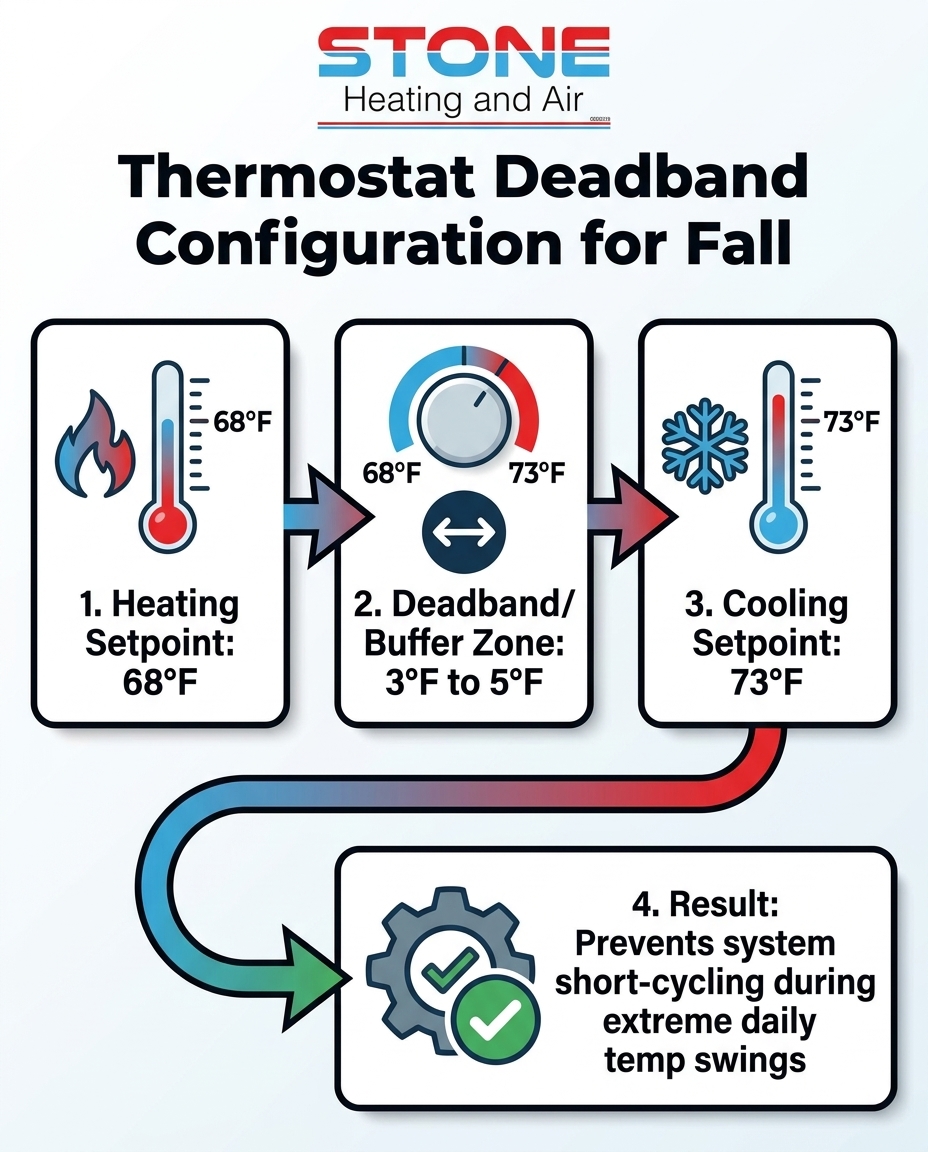
To maintain energy efficiency and protect your equipment during the Central Point / Rogue Valley fall season, you need to establish a deadband of at least 3 to 5 degrees. Here is how to configure it correctly:
1. Set your heating trigger: Align your heating setpoint with US Department of Energy recommendations for cooler months. Setting the heat to engage at 68 degrees ensures your mornings stay comfortable without burning excessive fuel.
2. Establish the buffer zone: Add 4 to 5 degrees to your heating setpoint to create your deadband. In this zone, your home relies purely on its insulation and the ambient outdoor temperature to stay comfortable.
3. Set your cooling trigger: Set the air conditioner to engage at 73 or 74 degrees. This ensures the AC only activates during true afternoon heat spikes, rather than turning on just because the house warmed up slightly from cooking lunch.
Programming Schedules for Diurnal Temperature Variations
Once you have enabled Auto Changeover and established a safe 5-degree deadband, the next step is layering a time-based schedule over those settings. A programmable thermostat allows you to break your day into distinct blocks, maximizing energy efficiency while ensuring the house is always perfectly conditioned exactly when you need it.
Aligning Settings with Morning Freezes
During the September transition, the coldest part of the day is usually right before dawn. Instead of waking up to freezing floors and waiting for the furnace to catch up, program your heating schedule to engage 30 minutes before your alarm goes off. If you wake up at 6:30 AM, set the furnace to bring the house to 68 degrees starting at 6:00 AM.
Once the household is awake, showered, and moving around, your bodies and appliances naturally generate heat. You can safely program the thermostat to lower the heating demand by a few degrees after 8:00 AM. Proper scheduling like this is a core part of comprehensive heating system preparation, ensuring you never pay to heat an empty house.
Anticipating Afternoon Heat Spikes
By early afternoon, the dynamic completely changes. Rather than fighting the afternoon heat immediately with your air conditioner, you can program your schedule to delay the cooling trigger until the indoor temperature genuinely requires intervention. Allow the home to naturally warm up with ambient sunlight first.
Best practices for afternoon scheduling include:
• Strategic setbacks: Relax your temperature parameters while the house is empty. If everyone is at work or school, allow the house to reach 76 degrees before the AC kicks in.
• Pre-cooling before arrival: Program the system to drop the cooling setpoint back down to 73 degrees roughly 45 minutes before you return home from work.
• Leveraging window treatments: Close blinds or curtains on south-facing windows before you leave for the day to block passive solar heat gain, reducing the workload on your AC later in the afternoon.
Supporting Your System Through High-Strain Months
Advanced thermostat settings are incredibly effective, but they are only as reliable as the underlying HVAC equipment. Running both a heating cycle and a cooling cycle within the same 24-hour period requires pristine mechanical conditions. If your system suffers from dirty filters, restricted airflow, or failing capacitors, demanding dual performance will quickly lead to a breakdown.
Recently, a Central Point homeowner reached out to our Stone Heating and Air team during the fall transition because they recognized the need for routine maintenance to keep their system working at peak performance. Our technicians provided a thorough service visit, evaluating the equipment and explaining exactly how to ensure correct maintenance between professional tune-ups. The outcome was a heating and cooling system fully prepared to handle the extreme daily temperature swings efficiently.
Professional technicians evaluate system performance during these transition months to ensure it can handle the unique strain of the Central Point / Rogue Valley climate. This level of comprehensive care goes far beyond just fixing unexpected breakdowns; it actively optimizes your performance and lowers your monthly energy consumption. To support your system at home, you should check your air filters more frequently during high-use transition periods. A clogged filter chokes off airflow, forcing the blower motor to work harder during both heating and cooling cycles, which can easily trigger safety switches and shut the entire system down.
If you want to guarantee that your equipment is ready for the seasonal shift, investing in comprehensive HVAC services ensures that every belt, motor, and electrical connection is verified before the true winter weather arrives.
Frequently Asked Questions About Fall Thermostat Settings
How do I set my thermostat for cold mornings and hot afternoons?
The most effective strategy is to utilize your thermostat's Auto Changeover mode combined with a properly configured deadband. By setting your heating target to 68 degrees and your cooling target to 73 degrees, the system will automatically handle the September transition. The furnace will warm the house during the cold morning hours, and the air conditioner will automatically take over when the afternoon heat spikes, requiring zero manual adjustments on your part.
What is auto changeover on a thermostat?
Auto changeover is an advanced operational mode that allows the thermostat to automatically switch between your heating equipment and your cooling equipment based on the current indoor temperature. Instead of manually flipping a switch from 'Heat' to 'Cool', the thermostat logic board constantly monitors the room. If the temperature drops below your heating setpoint, the furnace engages; if it rises above your cooling setpoint, the AC turns on.
How many degrees should my thermostat deadband be?
Industry standards and energy efficiency guidelines strongly recommend a deadband of at least 3 to 5 degrees. This buffer zone is the temperature gap between your heating and cooling triggers. A 5-degree deadband (such as heating at 68 and cooling at 73) prevents the system from short-cycling and fighting itself, protecting your compressor from premature wear and tear.
Should I leave my thermostat on auto during fall?
Yes, leaving your thermostat fan on 'Auto' and utilizing the 'Auto Changeover' system setting is highly recommended during the fall. Leaving the fan on Auto ensures that the blower motor only runs when the system is actively heating or cooling, which saves electricity. Utilizing Auto Changeover ensures your home stays comfortable despite drastic daily temperature swings.
Will switching between heat and AC in the same day damage my system?
Switching between heat and AC in the same day will not damage your system as long as you provide a sufficient deadband and allow the system to complete its cycles. However, rapidly and manually toggling the system back and forth without a buffer can cause short-cycling, which places immense strain on the compressor and blower motor. Automating the process is the safest approach.
Automate Your Comfort Before Winter Arrives
Managing the extreme daily temperature swings of the September transition does not require constant manual effort or daily frustration. By taking the time to properly configure your thermostat's auto changeover features, establishing a safe 5-degree deadband, and layering a smart daily schedule over those settings, you can seamlessly handle the weather without overworking your HVAC system.
Clear, actionable guidance on thermostat features is only part of the equation. Your equipment still needs to be mechanically sound to deliver that comfort reliably. Our team at Stone Heating and Air highly encourages homeowners to explore seasonal HVAC maintenance plans to ensure their furnaces and air conditioners are fully prepared for the heavy dual-demand workload. Take action today to optimize your home comfort systems before the freezing winter weather settles in for good.